

Hiding cables under your desk almost always starts with the same frustration: cords trailing across the floor, a power strip dangling visibly against your desk leg, and dust building up between the wires. Besides being unsightly, it's also a trip hazard, and your cables wear out faster. The only question is which solution fits your workspace.
We've lined up the 7 most popular methods, each with an honest verdict on price, installation, capacity, and when it is (and isn't) the right choice. Whether you work from home or want to tidy up your cables at the office, by the end you'll know exactly what you need.
How do you hide cables under your desk?
Hiding cables under your desk comes down to three steps: bundle the loose cords with a sleeve or velcro, hide the power strip in a cable box, and route the bundle up along your desk leg with clips or a cable tray. Without drilling, this works perfectly with a cable box, a sleeve, and self-adhesive clips.
First: how do you know which solution you need?
Before you buy anything, answer three questions:
- How many cables do you need to hide? 2–3 cables (laptop + monitor + charger) is a very different challenge than 8+ cables from a gaming setup or dual-monitor setup with a dock, speakers, and USB hub.
- Are you allowed to drill? Renting? Want to keep the desktop intact? That immediately rules out a few options.
- Do you want to see it or not? Some solutions hide everything completely (cable box, under-desk cable tray), others just bundle things neatly (sleeve, velcro).
With those three answers in mind, here's the comparison.
The 7 solutions compared
1. Cable box — the all-rounder
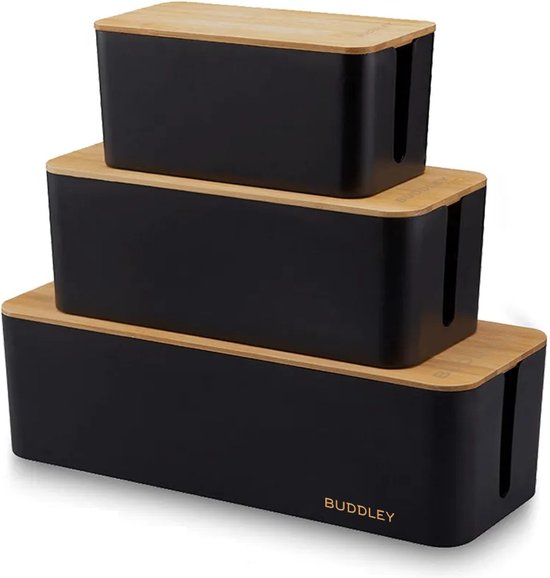
A cable box is a closed box where you put your power strip and excess cables. The plugs go in on one side, the cables to your devices come out the other side. Everything you don't want to see disappears into it.
Right for you if:
- You have 1 power strip with 4–8 plugs you want to hide.
- You don't want to drill any holes.
- You have a tile/wooden floor and the power strip is currently visible on the floor or on your desk.
Pros: no installation, suitable both under and next to the desk, flame-retardant material in good models, also good against dust and pets.
Cons: doesn't hide loose cables still running across the room — only the hub itself.
Price range: €15–€35.
Tip from Buddley: Our cable box in white is made for power strips with 6+ outlets and fits perfectly under a standard desk.

2. Under-desk cable tray — the cleanest look
A cable tray is a metal or plastic rail you mount under your desktop (screwed on or clamped). All cables run through it, from power strip to device, without you seeing a single one.
Right for you if:
- You have a fixed desk and want the cleanest solution.
- You have 4+ cables you want to bundle.
- You don't mind spending a bit (€25–€80) and 10 minutes of drilling is fine.
Pros: the tidiest look, cables no longer hang in sight, also suitable for sit-stand desks (cables move along with the tabletop).
Cons: you have to drill or clamp onto your desktop — not ideal for renters with a glass or thin tabletop.
Price range: €25–€80.
3. Cable sleeve — the quickest fix
A sleeve is a flexible fabric or neoprene tube with a zipper. You put all your cables in, zip it shut, and the bundle looks like one thick cable.
Right for you if:
- You want something done in 5 minutes, without drilling or mounting.
- You mainly have horizontally running cables (from desk to wall).
- Looks matter but you don't want to spend too much.
Pros: super fast, easy to adjust if you add a cable, affordable.
Cons: only hides — the cables are still there, you just see one thick "sausage" instead of 6 thin ones.
Price range: €8–€20.
4. Cable clips & cable holders — for the minimalist
Small plastic or silicone clips you stick to your desk, wall, or floor. Your cables click into them and stay in place.
Right for you if:
- You only have 2–4 cables.
- You want to determine exactly where each cable runs.
- You don't want to drill and don't want to buy a big box or tray.
Pros: cheap (€5–€15 for a set), no installation, repositionable.
Cons: unsuitable for many cables, adhesive strip can come loose on upholstered or warm surfaces.
5. Cable grommet + hole in the desktop — for the pro setup
Do you have a desk with a cable grommet (a round hole with a cover ring), or are you willing to drill one yourself? Then you can route all cables down through one point, straight into a cable tray or cable box.
Right for you if:
- You have your own desk or are allowed to drill.
- You have a lot of cables and want the absolute cleanest setup.
- You combine this with a cable tray for the best result.
Pros: professional look, all cables out of sight, ideal for dual monitor or gaming setups.
Cons: you need to drill (52mm hole saw), not reversible.
Price range: €5–€15 for the grommet itself.
6. Velcro & cable ties — the budget combination
The cheapest solution: velcro (reusable) or cable ties (single-use) to bundle cables, optionally combined with a few clips.
Right for you if:
- Your budget is low (<€10 total).
- Your goal is "less messy" rather than "invisible."
- You swap equipment regularly and want to stay flexible.
Pros: cheap, flexible, velcro is reusable.
Cons: never looks truly tidy — the bundles stay visible.
7. Built-in power module in the desk — the premium solution
A built-in module is a power strip recessed into the desktop. You lift a flap, put the cables in, close the lid — invisible and super neat. Especially common with conference tables and modern home-office desks.
Right for you if:
- You have a high-quality or new desk.
- Looks matter more than cost.
- You want one central connection point on your desktop.
Pros: the nicest-looking solution, super functional.
Cons: requires cutting work, price (€80–€250), not for renters.
Which solution fits whom? (Quick decision guide)
| Situation | Best solution |
|---|---|
| Renter, 3 cables, no drilling | Sleeve + a few clips |
| Own home, 6+ cables, clean look | Cable tray + grommet |
| Power strip visible on the floor | Cable box |
| Gaming setup, dual monitor | Cable tray + grommet + sleeve for loose cables |
| Quick fix, small budget | Velcro + clips |
| Premium home-office setup | Built-in module |
Hiding cords at the office or a shared workspace
At the office or a flex desk, different rules apply: you often can't drill and you share the workspace with others. Choose solutions you can remove again without damage. A cable box under or next to the desk hides the power strip, a sleeve bundles the cords to your monitor and laptop, and self-adhesive clips route everything neatly along the edge. Mainly want to hide your power strip under the desk? Clip it to the underside of the desktop or put it in a cable box, so there's nothing left on the floor to trip over.
Frequently asked questions
What's the difference between a cable box and a cable tray?
A cable box is a separate, closed box where you put a power strip — ideal for hiding the hub. A cable tray is a rail you mount under your desk to route cables along the way. You often use them together.
Which cable tray is best for a sit-stand desk?
A flexible cable tray (often a spiral or chain-link model) that moves along with the height adjustment. A fixed metal tray can get stuck or bend.
Can I hide cables without drilling?
Yes: cable box, sleeve, velcro, and self-adhesive clips all work without drilling. For 90% of home workers, that's enough.
How do you organize cables at the office without drilling?
Use a cable box for the power strip, a sleeve to bundle the cords, and self-adhesive clips along the desk edge. All three are removable, making them ideal for a rental property or shared workspace where you're not allowed to drill.
How do I hide cables on a glass desk?
Glass is tricky — use a sleeve for the bundle, a cable box for the power strip, and special clamps designed for glass tabletops (not adhesive clips, those come loose).
What do I do with excess cable length?
Coil up the excess length (not too tight — at least 5 cm diameter), secure it with velcro, and put it in a cable box. Don't wrap it around another device — that causes heat issues.
Conclusion
The best way to hide cables under your desk depends on three things: how many cables you have, whether you're allowed to drill, and how invisible you want it to be. For most home workers, a combination of a cable box for the power strip and a sleeve or cable tray for the loose cables is the sweet spot — affordable, quick to install, and it instantly looks 10x tidier.
Check out our full collection of cable management solutions at our cable box and cable tray collection — from cable boxes to complete desk sets.